


Simple and Easy to Start Targeted Attack Email Training Service.

Features

Point 1
Ideal for first-time training services!
Point 2
Unlimited access to our cloud-based service for just ¥150/month
Point 3
Simple yet feature-rich!

Targeted email attacks differ from mass spam emails in that they are cyberattacks aimed at specific companies or organizations.
They narrow down targets to the individual level, impersonating real emails from past communications and using real names,
making it difficult for ordinary users to detect due to their sophistication.
Countermeasures by systems alone are insufficient, and the targets are no longer just large corporations or government agencies.
All users need training to 'not open suspicious emails.'"


3 Reasons to Choose dmt

ic_1

Ideal for first-time training services!

Unlimited access to our cloud-based service for just ¥150/month

ic_2

Simple yet feature-rich!

Approximately 300 scenarios covering the latest attack emails, including Emotet

ic_3

Fully customizable self-service portal!

Freely customize the body text, attachments, destination screen, and sender information

WHAT'S dmt

What is Targeted Attack Email Training?

When targeted email attacks lead to malware infections, the damage extends not only to the company itself but also to affiliated companies and business partners. Addressing this issue has become a critical challenge that all companies and organizations must tackle. However, attack methods are becoming increasingly sophisticated day by day, resulting in a continuous cat-and-mouse game with system-based defenses.
To protect confidential and personal information from malicious malware, it is essential to implement a dual approach: in addition to system-based defenses, organizations must also adopt training-based measures that encourage employees to avoid opening suspicious emails, not open attachments, and refrain from clicking URL links.
In a targeted attack email training conducted in December 2022 for small and medium-sized enterprises and small businesses, out of 811 participants, 99 individuals (12.2%) opened the email and clicked the URL within the message. This underscores the critical importance of regularly conducting targeted attack email training.

Purpose of Targeted Attack Email Training

Improving employee security awareness through repeated training

Regular training allows employees to experience the potential of receiving targeted email attacks, heightening their awareness of the risks of confidential information/personal data leaks via emails and attachments.

Reduce open rates for suspicious emails, attachment open rates, and URL click rates

Strengthen defenses against targeted email attacks and provide awareness of key points for identifying suspicious emails. Sharing the latest attack email tactics within the organization is also crucial.

Initial Response When a Suspicious Email is Opened

Verify that appropriate actions based on organizational rules are taken after an email is opened. Utilize post-training reports and analysis to improve and strengthen countermeasures.

SERVICE

Service Overview

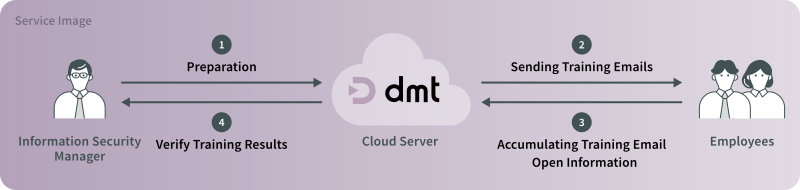
dmt is a fully self-managed targeted attack email training service that you can operate entirely on your own.
There’s no need to deal with any service providers. Designed with the training administrator in mind,
it comes packed with many useful features you’ve been looking for. Plus, it’s a low-cost, cloud-based solution that you can start using right away,
making it perfect for those running their first targeted attack email training.
Drawing on alerts from the IPA (Information-technology Promotion Agency), the Anti-Phishing Council, and the latest attack emails,
we offer around 300 pre-built training scenarios. You just need to set up your distribution list and schedule, and you’re ready to launch your training.

service

Simple and easy to start pricing

You get full access to all features and can conduct unlimited training sessions as many times as you like.
This makes it an ideal solution for targeted attack email training that requires repeated simulated experiences to improve literacy.

Practical training that keeps up with current trends

Targeted email attacks continue to evolve every day.
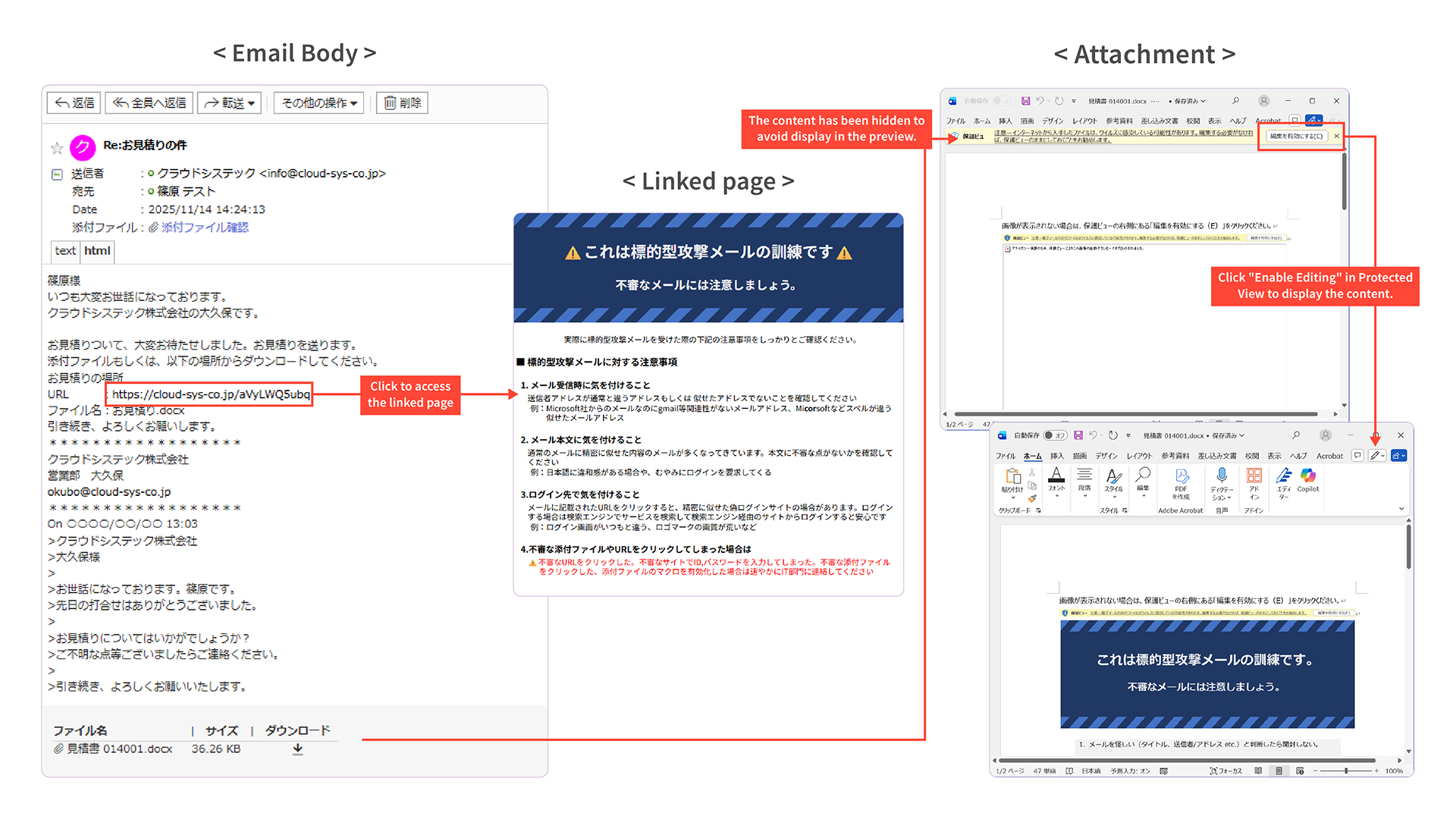
Training can realistically simulate various types, including attachment-based and URL link-based (phishing) attacks that mimic Emotet,
hybrid attacks combining attachments and links, emails impersonating internal communications or external partners and clients,
as well as those from external organizations or notification systems.

service

Highly versatile and fully customizable

The service includes a wide range of features such as approximately 300 training scenarios, editing of emails and attachments, selection of sender addresses and training domains with 14 available domains, distributed delivery to reduce server load, comprehensive action tracking with the option to exclude certain actions from display, and a dashboard for monitoring training progress.
Being a self-managed service, it allows full customization of training content and participants to suit your specific needs.

feature-1
feature-1
feature-1
feature-1

Reporting features for comprehensive training analysis

Two types of reports are automatically generated and available for download:

Training Results Summary

data recording the final status of each training participant for status review

Event Log

data capturing all actions taken by participants for detailed analysis

Downloadable Content

Reports

feature-1

CSV Data

Survey Results.csv
(For status verification)

Data recording the final status of trainees.
(Example: 100 rows displayed for 100 trainees)

Event.csv - For Detailed Analysis

Data recording all action statuses for trainees.

TRAINING FLOW AND FEATURES

Training Flow and Key Features

STEP

01

Preparation/Testing

Preparation
  • Develop implementation methods based on objectives
  • Prepare email body text and attachments
  • Prepare (configure) action status recording for trainees
  • Prepare (configure) spam filtering settings for training emails
Test Distribution
  • Unlimited test distribution attempts available.

STEP

02

Create distribution list

Distribution list registration
  • Distribution list template
  • Bulk registration of distribution lists
  • Bulk modification of distribution lists
  • Distribution List Download
Distribution List Items
  • Last Name
  • First Name
  • Email Address
  • Department
  • Position
  • Field (Free text)
    Can be inserted into all email bodies
How to Use the Item
  • Employment status
  • Years of Service (e.g., new hires)
  • Work Location
  • Company Name
    ...etc.

STEP

03

Training Content Creation

Select Training Type
  • URL Link Type
  • Attachment type
  • Combination Type
    (URL Link Type + Attachment File Type)
Templates
  • Approximately 200 training scenarios
  • Japanese/English
Customization
  • Modify email body text
  • Insertion of names and other variables into email body text (※)
  • Change to user-original attachments
  • Changing the linked destination page
  • Change sender settings
  • Select training domain
  • Send from user domain
  • Create training content

STEP

04

Training Implementation

Date/Time Settings & Delivery Method
  • Scheduled Delivery
  • Time Slot/Day Settings
  • Training Domain Settings
  • Distributed delivery to reduce load on mail servers
Preview confirmation
  • Email body
  • Link destination screen
  • Sender settings
Confirming Implementation Status
  • Retrieve all action statuses for training participants
  • Supports status retrieval for PCs/smartphones
  • Real-time confirmation of training status
  • Shared link allowing third parties to view only training status

STEP

05

Training Results

Dashboard
  • Real-time monitoring during and after training
  • Detailed display of trainee status
  • Multiple trainer accounts can be set up
    (View-only permissions also possible)
Training Result Data
  • Report in report format (Excel)
  • Training results (CSV)
  • Event list (CSV)
  • System-based action status exclusion display settings
Result Analysis and Next Plan
  • Data analysis
  • System-based action status exclusion display settings
  • Plan Next Training Based on Analysis

We use cookies on this website to improve your user experience. By continuing to use the site, you consent to our use of cookies.