
 For Microsoft 365 / Google Workspace
Enhancing security without disrupting users has long been a challenge for many system administrators. Now, senders simply attach a file and send the email as usual. Active! gate SS for Microsoft 365 and Google Workspace identifies messages that meet defined criteria and automatically—without user intervention—encrypts or detaches attachments. It helps prevent data leaks from mis-sent emails using seven distinct safeguards. By reinforcing good email etiquette, it also strengthens your company’s professional image.
7 Approaches to Prevent Erroneous Email Sending
One little mistake can be fatal in business. Active! gate SS for Microsoft 365 / Google Workspace protects your company from information leakage caused by email communication.
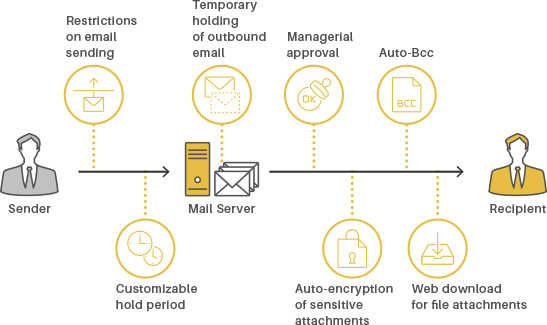
Auto-encryption of sensitive attachments (designs, contracts, documents, etc.)
The sender just needs to send an email with an attached file. Active! gate SS automatically encrypts the file with a password and delivers it to the recipient securely.
Web download for file attachments
When the size of the file attachment exceeds the specified value, the file is separated from the body of the email and uploaded on our cloud infrastructure. The recipient accesses the notified URL to download the file.
Auto-holds on sent email for recheck or altering
When a particular email is sent, it is held automatically and the hold-notification email is sent to the sender. The sender then accesses Active! gate personal controller to recheck the destination, the subject, the body of the email and the attachment before sending it out.
Customizable hold period
This function is used in combination with auto-hold and allows you to send the same email at different times based on the recipients or other criteria. This means you can configure settings to send your email to internal recipients immediately and then to external recipients after a certain amount of time has passed.
Auto-Bcc
Active! gate SS can convert your email header. When sending an email to many recipients simultaneously, this function prevents the leakage of email addresses by shifting the email addresses from the “To” or “Cc” fields to the Bcc field.
Restrictions on email sending
The administrator can set up policies which prevent outgoing emails matching specific criteria. For example, you can reject the transmission of emails which contain a keyword such as “Important” or emails which contain a competitor’s domain or free mail address. This function enables to monitor and eliminate unauthorized sending of emails.
Managerial approval
A manager or specified third party (the “approver”) can check emails which are sent from the user (the “approval seeker”) before sending them out. In addition, this function can automatically add the manager’s email address to the “Cc” or “Bcc” field to minimize an approver’s work load. This function greatly reduces information leakage caused by small internal mistakes.
System Configuration
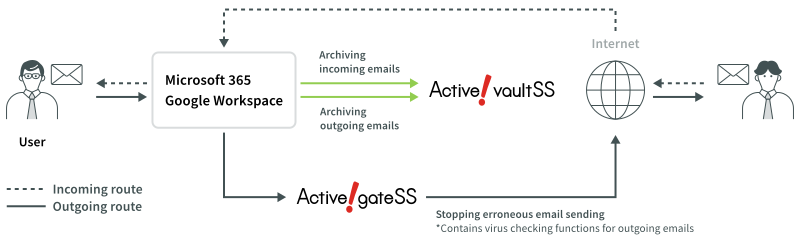
Simply change the outgoing connection.
Active gate SS does not affect the delivery route. This means that if any error caused by Active! gate SS, it will never cause transmission failure.